Your recipes. Your people. Your cookbook.

Create a cookbook together. Keep the recipes forever.

Printed family recipe cookbook, open cookbook pages, handwritten recipe cards, and a phone used to scan recipes

Gather recipes with family and friends, add photos and stories, and create a custom printed cookbook. Start online on your computer or use the ReciScan app on your phone or tablet.

Create in your browser. No app download required. Already a member? Sign in · Pricing

Start creating for free. Order printed books when you’re ready. A subscription is optional; printing is purchased separately. Estimate your book below.

Download on the App Store Get it on Google Play
Visit the ReciScan blog — recipes, tips and stories

Made together. Shared around the table.

Printed family recipe cookbook, open cookbook pages, handwritten recipe cards, and a phone used to scan recipes

Make it yours. Know the cost.

Estimate your cookbook price

6 × 9 inch books. Pick a format and compare printing costs.

Customize your printing estimate
Printed pages not recipe count
Choose your binding

Enable JavaScript for estimates, or see your book’s price in Preview & print.

Start your cookbook free

Printing estimate only. Shipping, handling and tax extra. Final price shown before payment. Subscription fees are separate.

Recent 5-star reviews
"Formatted each recipe beautifully."
Apple App Store
"No manual entry, just a snapshot of a recipe."
Google Play
"Such a time saver and easy to use!"
Apple App Store
"The scanning was great."
Google Play
"Really enjoyed this and would highly recommend."
Apple App Store
"...a beautiful family recipe book!"
Google Play
More reviews

From a favorite recipe to a family keepsake

A custom cookbook, made with your favorite people

Start a family recipe book, bring your community together for a fundraiser, or create a cookbook to sell. ReciScan gives your project a home online, with a printed book to look forward to.

  1. Gather your recipes

    Scan recipe cards, upload photos, or type a favorite. Bring the recipes you love into one cookbook.

  2. Make it together

    Optionally invite a small team to help edit and design. With an active owner subscription, share a collection link so friends can send recipes without an account.

  3. Make it yours

    Review contributions, organize chapters, and add photos and stories. Preview the pages before ordering.

  4. Put it in print

    Order keepsakes and gifts, plan a cookbook fundraiser, or explore selling through a storefront.

Start your cookbook online

Basic cookbook creation is free. Subscription features and printed books are available separately.

Preserve Family Recipes, Online or in the App

ReciScan makes it incredibly easy to scan handwritten recipes, upload images, and organize your culinary creations. It’s more than just a cookbook maker—it’s a way to share and protect your family’s cooking legacy for generations to come.

Upload or scan recipe cards directly from your device

Add personal notes, author bios, and prefaces

Use templates or custom covers for a unique look

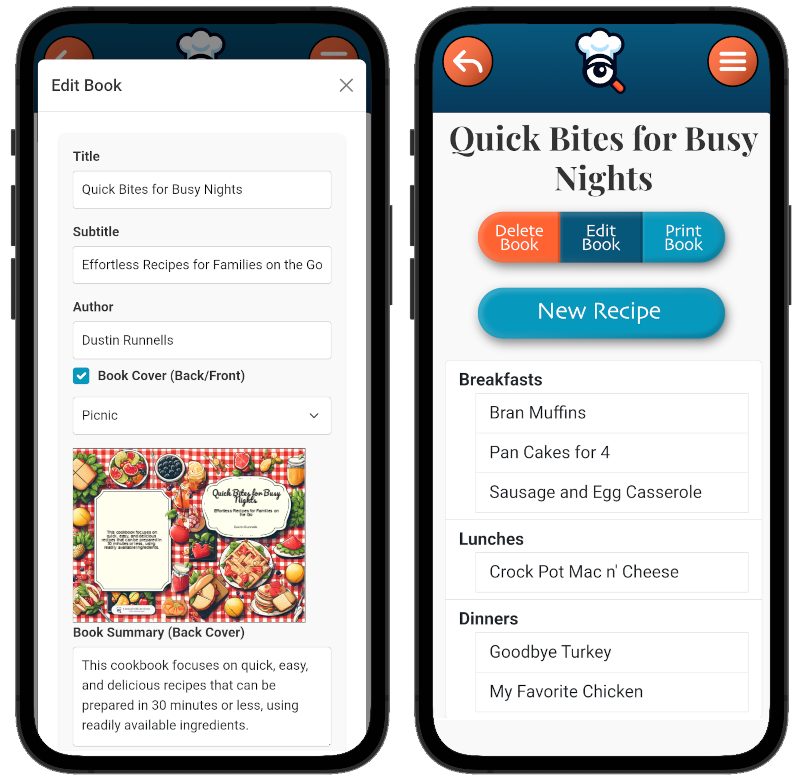
ReciScan App Screenshot
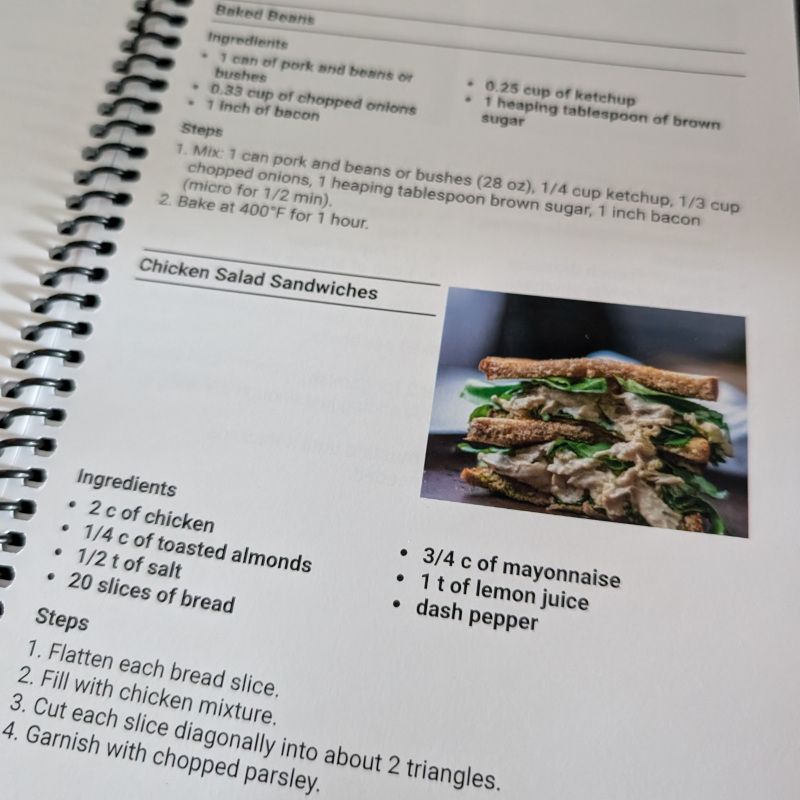
ReciScan Printed Cookbook Cover ReciScan Printed Cookbook Interior

Why Choose ReciScan?

We believe every recipe tells a story. ReciScan allows you to bring those stories to life in a professionally printed cookbook.

Beautiful Printed Cookbooks

Turn your recipes into full-color coil bound, paperback, saddle-stitch, or hardcover keepsakes you can treasure or give as a gift.

Fully Customizable Design Features

Personalize every page, add vibrant photos, insert personal anecdotes, and craft bespoke covers with the built-in designer.

1:44 finished-book tour

See What Your Finished Cookbook Can Look Like

Open the cover and flip through a real ReciScan cookbook to see the print quality, flexible layouts, and personal details that turn a collection of recipes into a book worth keeping.

A close-up look at the cover, binding, recipe pages, photos, custom pages, and back cover. Watch on its dedicated video page.

  • Custom front and back covers
  • Photos and handwritten cards
  • Chapters and custom pages
  • QR codes and personalized styling

About this example: The featured book was created for a team fundraiser. The same print quality, formats, and cookbook design features are available for family keepsakes, gifts, creator cookbooks, and community projects.

Key Features of the ReciScan App

Easy Scanning and Editing

Scan handwritten cards, upload photos, paste website URLs, or import shared ReciScan codes—every recipe is transcribed and formatted into clean, stylish pages in seconds.

Create ready-to-post recipe videos and imagery so you can share family favorites on Instagram, Facebook, or TikTok without leaving the app.

Print in the Format Your Family Loves

Preview every page, then choose coil bound, paperback, saddle-stitch, or hardcover printing—all produced on premium stock and ready to ship quickly.

Smart Recipe Tagging

Organize each recipe by course, contributor, diet, or occasion so assembling chapters and reordering content takes just a few taps.

Exclusive Subscriber Benefits

See current subscription pricing in your Portal account. Subscription is optional and renews automatically until canceled. Printed books are purchased separately; compare standard and subscriber printing estimates.

  • Get subscriber pricing on printed books
  • Use the Cover Designer to build custom artwork and layouts
  • Download home-print-ready PDFs whenever you need extra copies
  • Group Recipe Collection: Great for fundraisers or family reunion books

One Cookbook Maker, Many Possibilities

Start with the path that fits your project, then use ReciScan to collect, design, print, and share your cookbook:

Prefer your phone or tablet? Get the ReciScan app

For the best experience on phones and tablets, use the app. Available on the Google Play Store and Apple App Store, ReciScan offers a seamless mobile experience to create, manage, and print your own custom cookbook with just a few taps.

Bookstore-quality printing and fast shipping directly from the app.
Five-star App Store review praising ReciScan for beautiful family cookbooks
Choose your app store
Download on the App Store Get it on Google Play

Get Started Today!

Start a cookbook for free, then order printed copies when you’re ready. Estimate your printing cost and compare optional subscriber pricing before you begin.

Don’t let your favorite recipes fade away. Start preserving your culinary legacy now with ReciScan.

See How Easy

Watch how you can go from recipe to a beautifully printed cookbook using the ReciScan app. It’s fast, simple, and super fun to share with family!

Watch the complete start-to-finish cookbook walkthrough, with eight chapters.