The ReciScan Blog
Introducing Cloud Cookbooks: Make a Cookbook Together with ReciScan
Create a cookbook online, invite others to help, collect recipes, and turn your shared favorites into a printed book.
Some of the best cookbooks start with a conversation: “Do you still have Grandma's pie recipe?” or “Could everyone send in a favorite?” Now there's a new way to bring those recipes together.
We're excited to introduce cloud cookbooks in ReciScan! You can create and work on a cookbook online, invite others to help, and turn the finished collection into a printed book to share, give, or sell.
Whether you're gathering recipes from relatives or organizing a fundraiser, your cookbook has a place to come together—even when your cooks aren't in the same kitchen.
Start with a cookbook of your own
Open the ReciScan portal, choose Cookbooks, and create a book. Give it a title, choose a cover, and add chapters to organize your recipes. You can enter recipes manually, upload recipe images, or use recipes from your Recipe Drawer.
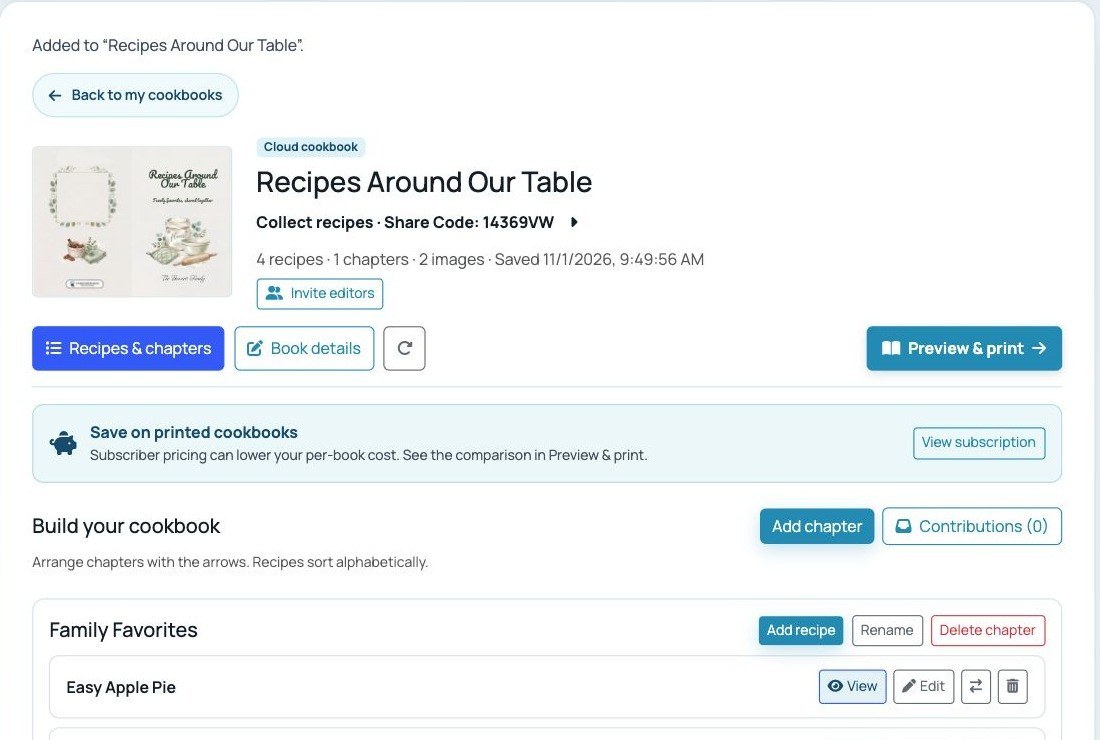
An example cloud cookbook workspace, with its cover, sharing controls, and a chapter of family favorites.
Try this: Start with just a few chapters—perhaps Family Favorites, Holiday Dishes, and Desserts. You can add and rearrange chapters as your collection grows.
Invite a little help—or collect recipes from everyone
A family cookbook doesn't have to be a one-person project. Invite someone as an editor when you want them to help add recipes and work on the book. For example, one sibling might organize chapters while another adds recipes and checks family details.
Want to gather recipes without giving everyone editing access? With an active subscription, the cookbook owner can share the book's Share Code or collection link. Contributors can send recipes through the web form or the app, and the owner or editors can review submissions in Contributions before adding them to a chapter. The code is for submitting recipes; it doesn't grant editing access.
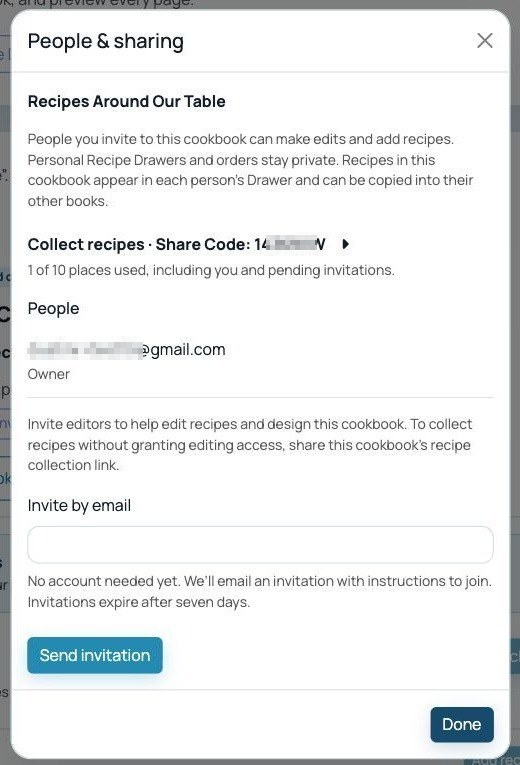
Invite editors from People & sharing, or use the collection link to gather recipes without giving contributors editing access.
Tip: When you ask for a recipe, ask for the story too. A sentence about who made it or when your family serves it can make the finished book even more meaningful.
Make it personal
A cookbook can hold more than ingredients and instructions. Add photos and notes, choose a cover, and introduce the people behind the recipes. Subscribers can also use custom covers and custom pages to add a dedication, family photo, or other design to the book. See our custom pages walkthrough for ideas.
For a community project, those pages could introduce your group, thank sponsors, or feature a coupon from a participating business. Our cookbook fundraiser guide has more ideas for collecting recipes and planning sales.
Preview it, then hold it in your hands
When you're ready, open Preview & print to prepare the interior and cover previews. Look through the pages, check recipe details and photos, and make any changes before ordering printed copies.
You can also work with cloud cookbooks in the ReciScan app after linking your account. However you build it, the goal is the same: a cookbook made from recipes worth sharing.
Ready to get started? Open the ReciScan portal and create your cloud cookbook.